
Version 1.4.0 · Windows desktop · Seven protocols
One window for every remote connection you use.
RDP, SSH, SFTP, FTP/FTPS, MySQL, PostgreSQL and SQL Server — one connection list, one tab strip, one native Windows app. Stop juggling mstsc, PuTTY, FileZilla and SSMS.
Free tier: 5 saved connections, 3 sessions at once. Every protocol and every feature included.
The core idea
One task rarely stays inside one tool.
Checking a deployment means a desktop, a shell, a file listing and a query — four apps, four credential prompts, four ways of organising the same servers. RDP Engine puts all of it in one sidebar and one tab strip.
Four tools, four habits
mstsc for the desktop. PuTTY for the shell. FileZilla for the files. SSMS for the query.
Each with its own connection list, kept in step by hand.
One window, one list
Seven protocols in the same sidebar, opening as tabs that stay live in the background.
Organised in folders you nest yourself, and portable as a single file.
Four situations it was built for
System administrators, developers and managed-service consultants — usually holding several servers open at once.
Running an estate
Dozens of servers across clients, environments and data centres, organised in nested folders that match how you already think.
Deploying a web app
Paste the FTPS string Azure App Service hands you and the type, host, port, TLS and start folder fill themselves in.
On-call at 3 a.m.
Tail the log, restart the service, check the disk — one click each from the saved-commands panel, no incantation to remember.
Answering one question
Check a table or run one query against MySQL, PostgreSQL or SQL Server without launching a separate database tool.
Feature inventory
Twelve capabilities, grouped by the job they do
Connect to anything
Seven protocols, one tab stripRemote desktop
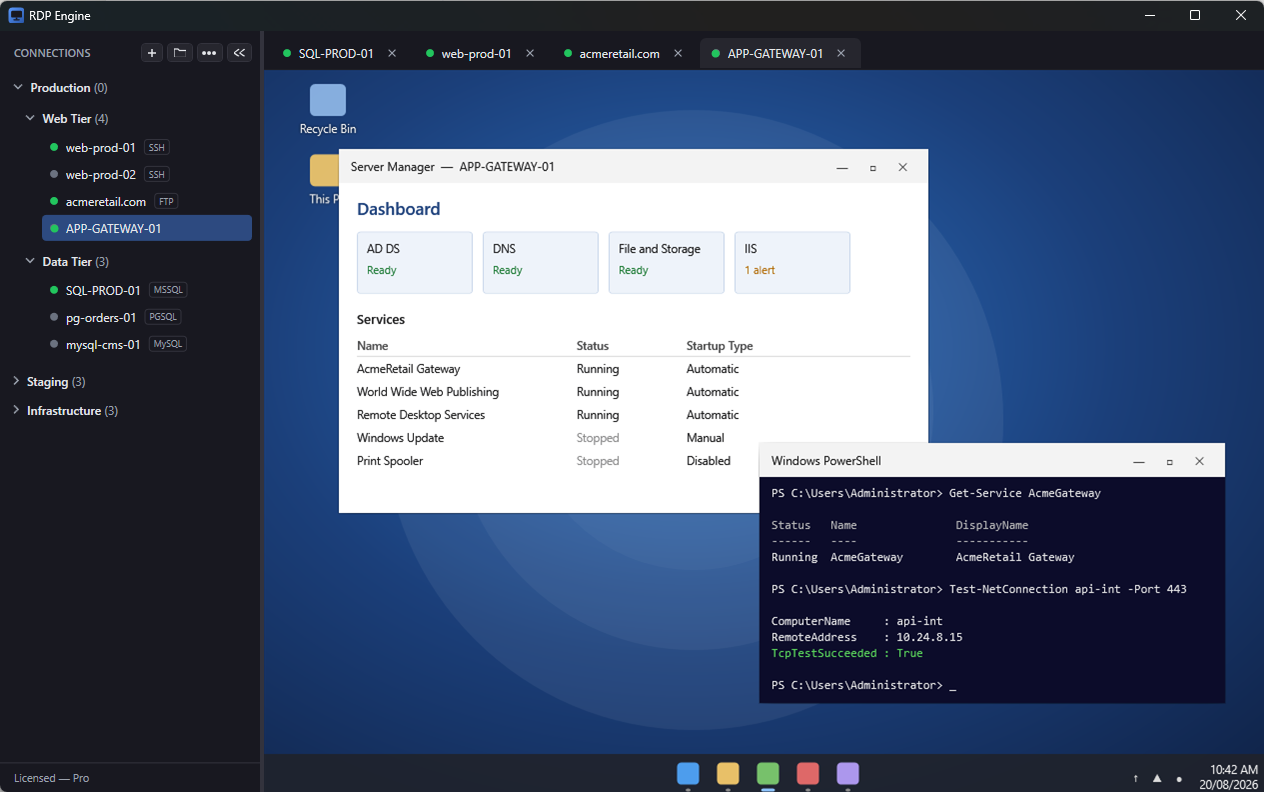
ALL TIERSEmbedded, multi-session RDP — several desktops open at once, each in its own tab, all inside one window.
- Live dynamic resolution — resize the window and the remote desktop reflows, no scrollbars or letterboxing
- Clipboard redirection and keyboard capture, so Alt+Tab goes to the remote session
- Automatic reconnect with the server’s actual disconnect reason
- Saved credentials with domain, or the standard Windows prompt at connect time
SSH terminal
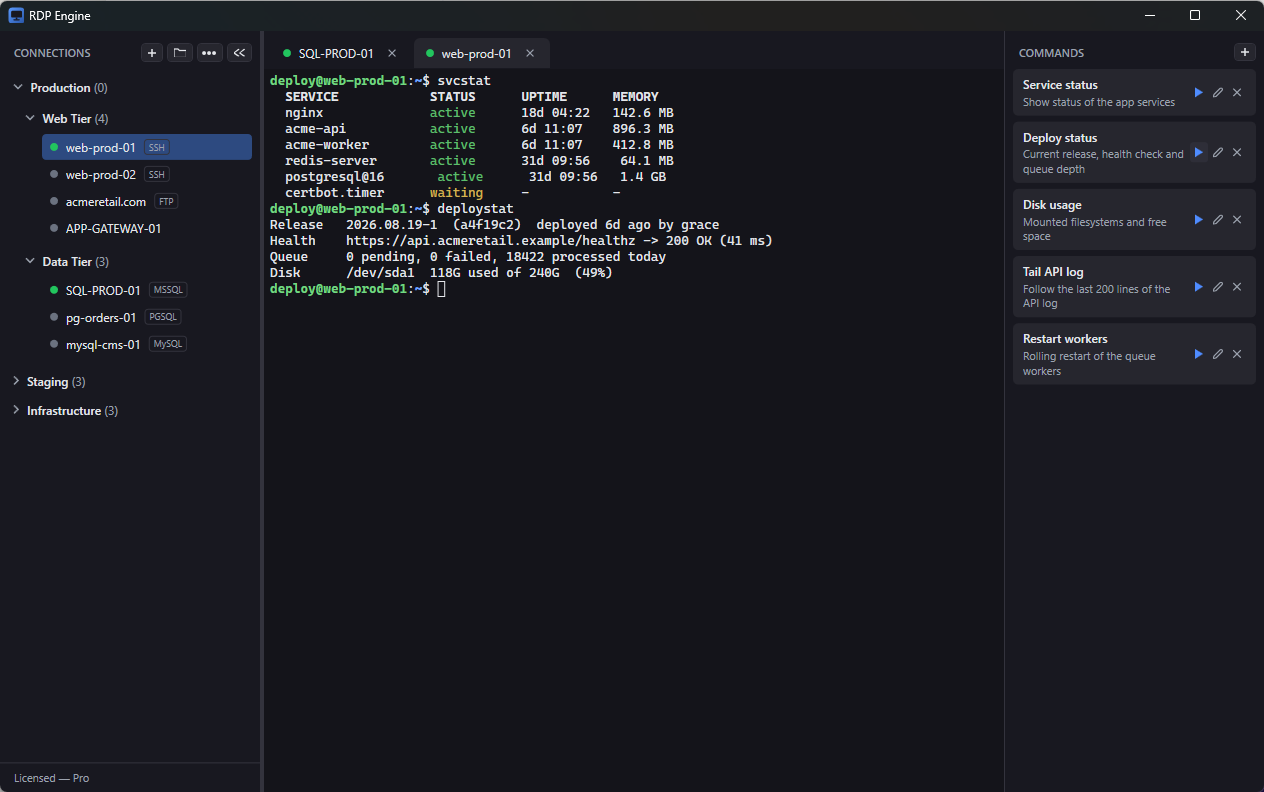
ALL TIERSA real terminal emulator, written for this app rather than bolted on.
- xterm-256color with 24-bit true colour, bold, dim, underline and reverse video
- Full-screen TUI support — vim, htop, less, top and anything using the alternate screen buffer
- 5,000 lines of scrollback, mouse selection, bracketed paste
- Live resize tells the remote PTY the new size, so full-screen apps redraw correctly
File transfer
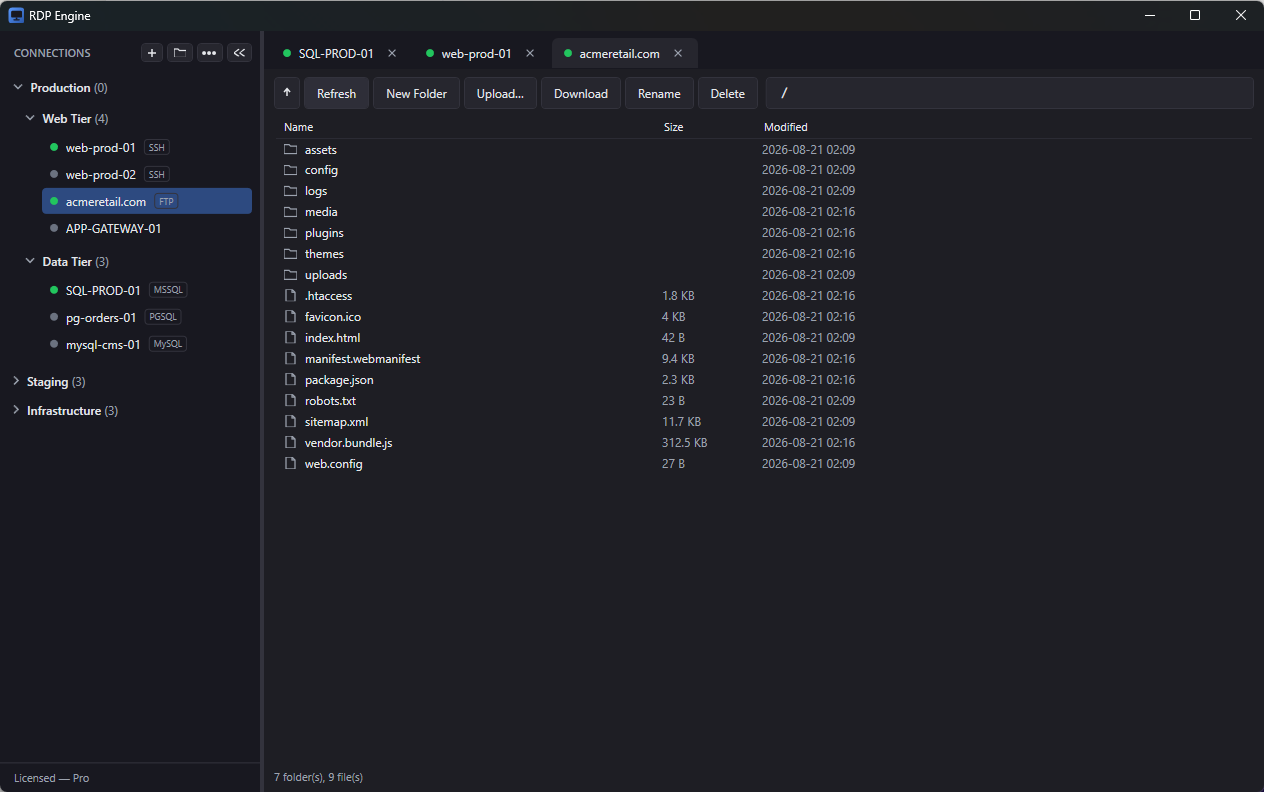
ALL TIERSA no-nonsense remote file browser over SFTP, FTP and FTPS.
- Drag files straight from Windows Explorer into the listing to upload
- Rename, delete (including recursive), create folders, multi-select download
- Live progress with cancel on every transfer
- Per-connection start folder, explicit-TLS FTPS, and anonymous FTP
Organise like you think
An estate of any size stays readableFolders & drag-and-drop
ALL TIERSFolders that nest as deep as you like — by client, environment or data centre.
- Move a connection into a folder, reorder within one, nest a folder or drag it back to the root
- Drop targets highlight as you drag; impossible moves are refused rather than breaking the tree
- Folders remember whether they were expanded
Tabs & live status
ALL TIERSEvery open session gets a tab, and switching tabs never disconnects anything.
- Sessions stay live in the background while you work elsewhere
- Status dots in the sidebar and tab strip: grey disconnected, amber connecting, green connected
- Protocol badges — SSH, SFTP, FTP, MySQL, PGSQL, MSSQL — keep a long list readable
- Ctrl+B collapses the sidebar and gives the whole window to the session
Paste a URL to configure
ALL TIERSPaste a connection string into the Host field and the whole form fills itself in.
- Type, host, port, TLS setting and starting folder are all detected
- Handles the ftps:// strings Azure App Service hands you
- ftp://, sftp://, ssh://, rdp://, mysql://, postgres:// and sqlserver:// work the same way
- Usernames and database names come across too
Query without leaving
MySQL, MariaDB, PostgreSQL and SQL ServerObject explorer
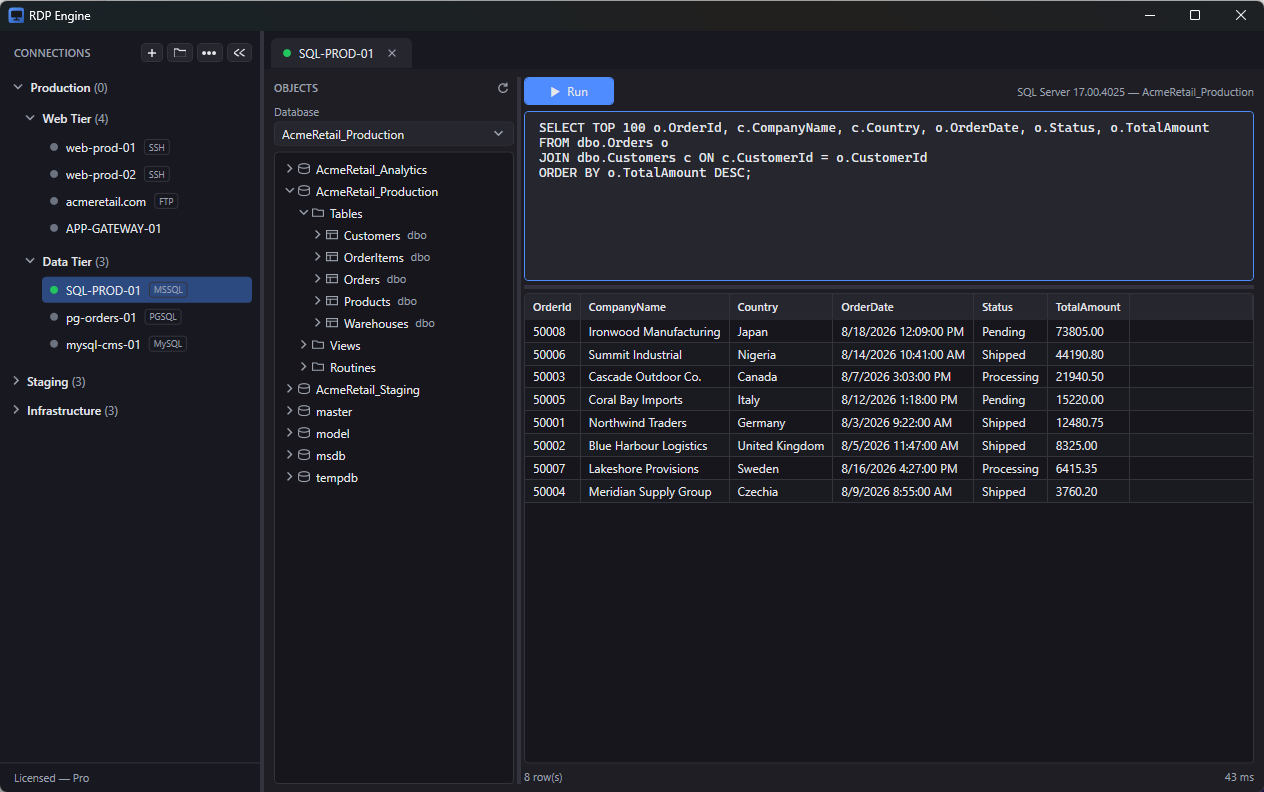
ALL TIERSDatabases, schemas, tables, views, routines and columns, following each server’s own conventions.
- Columns show type, nullability and the primary-key marker
- Children load lazily, so a server with hundreds of databases stays responsive
- Double-click a table for a preview query, correctly quoted for the dialect
- Right-click to copy a qualified name or refresh a branch
Query editor
ALL TIERSEnough of a workbench to answer a question without launching a separate tool.
- Run with F5 or Ctrl+Enter; with text selected, only the selection runs
- Multiple result sets from one batch, with a picker to move between them
- Elapsed time and row counts on every run, and cancel for a long query
- SQL errors appear inline in red — a typo doesn’t kill your session
Database switching
ALL TIERSA picker above the tree switches which database the session is working in.
- MySQL and SQL Server switch in place
- PostgreSQL reconnects transparently, the way pgAdmin behaves
- Your saved connection is never modified
- Results capped at 5,000 rows per set, so a careless SELECT * can’t lock up the app
Keep credentials safe, and portable
Local by default, exportable on purposeSaved commands
ALL TIERSA panel beside every SSH session holding the commands you run over and over.
- Each has a name, an optional description and the command text
- Click the run arrow or double-click the card to type it into the active terminal and run it
- Saved with your configuration and available in every SSH session
- Good for tailing a log, restarting a service or running a deployment script
Credential storage
ALL TIERSPasswords are encrypted with Windows DPAPI, tied to your Windows user account.
- Unreadable by another user or on another machine, and never transmitted to SquidSpark
- Leave a password blank to be prompted at connect time instead
- SQL Server supports Windows authentication and named instances
- Everything is stored locally under %AppData%\mrdp
Import & export
ALL TIERSMove an entire connection library between machines as a single .mrdp.json file, folder structure intact.
- Saved passwords can be included optionally, sealed with a passphrase you choose
- PBKDF2 + AES-GCM; raw DPAPI blobs never leave the machine
- On import, folders match by name and duplicates are skipped
- Passwords are re-encrypted for the local user
Runs locally
Credentials stay on your machine
RDP, SSH, file transfer and database traffic flows directly between your machine and your servers — never through SquidSpark infrastructure. Without a licence the app makes no network calls to us at all.
Every feature free, limits lifted when you licence
The free tier has no expiry and holds nothing back on capability. The limits are on how many connections you save and how many sessions you run at once.
Free
$0 no expiry
Five saved connections and three simultaneous sessions. All seven protocols, the object explorer, saved commands and drag-and-drop included.
Download freeLicensed
$49 CAD per licence, per year
Unlimited saved connections and unlimited simultaneous sessions. One licence activates on up to three devices, and an activation can be released from inside the app to move it to another machine. The annual subscription keeps you on the newest release; if you do not renew, you keep the last version published during your term and can carry on using it.
Buy nowRenews annually at the then-current price; cancel any time. A validated licence keeps working offline for 30 days.
| Feature | Free | Licensed |
|---|---|---|
| Saved connections | 5 | Unlimited |
| Simultaneous sessions | 3 | Unlimited |
| All seven protocols | Yes | Yes |
| Object explorer & query editor | Yes | Yes |
| Saved commands | Yes | Yes |
| Folders & drag-and-drop | Yes | Yes |
| Import & export library | Yes | Yes |
| Offline use | Always | 30 days per validation |
Activating
From the sidebar, ⋯ → Activate License. Nothing else changes about how you work.
Working offline
A validated licence keeps working offline for 30 days, so a disconnected machine is fine.
Moving machines
A licence is tied to a device and can be deactivated to free the slot for another machine.
Technical specifications
- Protocols
- RDP (3389), SSH (22), SFTP (22), FTP/FTPS (21), MySQL/MariaDB (3306), PostgreSQL (5432) and SQL Server (1433). All seven open as tabs in the same window and can run simultaneously.
- Remote desktop
- Embedded multi-session RDP using the Microsoft Terminal Services control built into Windows, with live dynamic resolution or scale-to-fit per connection.
- Terminal
- xterm-256color with 24-bit true colour, alternate screen buffer and scroll regions, 5,000 lines of scrollback, bracketed paste, and live PTY resize.
- Databases
- Object explorer and query editor for MySQL, MariaDB, PostgreSQL and SQL Server. Results capped at 5,000 rows per set; multiple result sets per batch.
- Authentication
- RDP saved credentials with domain; SSH password, keyboard-interactive or private key; SQL Server Windows authentication including named instances and (localdb)\MSSQLLocalDB.
- Operating system
- Windows 10 and Windows 11, 64-bit.
- Runtime
- Native WPF desktop app on .NET 10 — no Electron, no browser runtime.
- Installation
- Self-contained MSI with no .NET runtime prerequisite. Per-machine install to Program Files\SquidSpark\RDP Engine with a Start-menu shortcut and clean in-place upgrades.
- Credential storage
- Windows DPAPI, tied to your Windows user account. Stored locally under %AppData%\mrdp and never transmitted to SquidSpark.
- Import / export
- A single .mrdp.json file carrying the whole library with folder structure intact. Optional password inclusion sealed with PBKDF2 and AES-GCM.
- Appearance
- Modern dark theme throughout, including all dialogs and the Windows title bar.
- Connectivity
- No telemetry, analytics or crash reporting. Without a licence the app makes no network calls to SquidSpark at all.
Questions prospects actually ask
Is the free tier crippled?
No. Every feature is available on the free tier, including all seven protocols, the object explorer, saved commands and drag-and-drop. The limits are five saved connections and three simultaneous sessions.
Does my traffic go through SquidSpark?
Never. RDP, SSH, file transfer and database traffic flows directly between your machine and your servers. The app contains no analytics, crash reporting or usage tracking, and without a licence it makes no network calls to us at all.
Where are my saved passwords kept?
Locally under %AppData%\mrdp, encrypted with Windows DPAPI and tied to your Windows user account, so they cannot be read by another user or on another machine. You can also leave a password blank and be prompted at connect time.
Can I move my connection library to another machine?
Yes. Export the whole library as a single .mrdp.json file with the folder structure intact. Passwords can be included optionally, sealed with a passphrase you choose using PBKDF2 and AES-GCM, and are re-encrypted for the local user on import.
What do we need to install first?
Nothing. A self-contained MSI with no .NET runtime prerequisite, installed per machine to Program Files\SquidSpark\RDP Engine with a Start-menu shortcut and clean in-place upgrades. Windows 10 and Windows 11, 64-bit.
Close three of the four windows
Five connections free, no expiry, every protocol included.